
Download BeWeather 3 – weather forecast, weather widget, iOS weather app, weather app for iPhone, real-time weather updates, weather radar, storm tracking, weather alerts, precipitation forecast, wind speed, atmospheric pressure, temperature tracking
Overview
BeWeather 3 is a dedicated weather application designed for iOS users seeking a comprehensive and customizable weather experience. The app delivers current weather conditions and forecasts, enabling users to monitor temperature, wind speed, atmospheric pressure, wind chill, cloud cover, and precipitation in real time. It supports both short-term and extended forecasts, providing detailed data for today, tomorrow, and the next seven days. The software is tailored for individuals who prioritize accurate, up-to-date weather information for daily planning, travel, outdoor activities, or professional use in weather-sensitive fields.
Designed with a focus on usability and personalization, BeWeather 3 allows users to manage an unlimited number of locations, making it ideal for frequent travelers, remote workers, or those monitoring weather across multiple regions. The app features a dynamic weather widget that users can customize to display preferred metrics and layouts. Real-time weather alerts help users stay prepared for severe weather events, while interactive radar and satellite maps offer visual insights into storm systems, lightning activity, and cloud formations. The developer, BeWeather, has positioned the app as a go-to solution for weather-conscious iPhone users.
Key Features & Capabilities
- Real-Time Weather Monitoring – Provides live updates on temperature, wind speed, wind gusts, atmospheric pressure, wind chill, and cloud cover, allowing users to track current conditions with precision.
- Extended Forecasting – Offers detailed forecasts for today, tomorrow, and up to seven days in advance, supporting informed decision-making for daily routines and long-term planning.
- Customizable Weather Widgets – Users can personalize the appearance and data layout of the widget to match their preferences, including layout, color schemes, and displayed metrics.
- Multi-Location Tracking – Supports an unlimited number of locations, enabling users to monitor weather across different cities, regions, or personal travel destinations.
- Severe Weather Alerts – Delivers real-time notifications for extreme weather conditions, helping users prepare for storms, high winds, or other hazardous events.
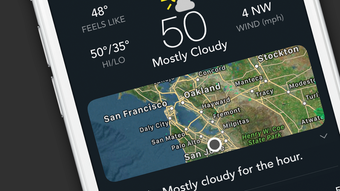
- Interactive Weather Maps – Includes access to radar and satellite imagery, with visual indicators for lightning flashes, thunderclouds, and storm systems.
- Graphical Weather Visualization – Displays weather trends in a graph format upon launch, offering a quick overview of temperature, precipitation, and other key metrics.
These capabilities are particularly useful for outdoor enthusiasts, commuters, event planners, and professionals in agriculture, construction, or logistics who rely on accurate weather data. The ability to switch between locations with a simple swipe enhances usability, especially for users managing multiple geographic areas.
User Interface, Workflow & Performance
The user interface of BeWeather 3 is designed for intuitive navigation, featuring a clean layout with clear visual hierarchies. Core weather data is presented in a structured format, with real-time updates reflected instantly upon app launch. Navigation is streamlined, allowing users to switch between locations and access detailed forecasts through simple swiping gestures. The customizable widget integrates seamlessly with the iOS home screen, offering quick access to essential weather information without opening the full app.
Workflow efficiency is enhanced by the app’s responsive design and minimal interaction steps for common tasks such as adding locations, viewing forecasts, or checking alerts. The developer did not specify resource usage details, so performance behavior under varying conditions remains unspecified. However, based on general software behavior patterns, the app is expected to operate smoothly on supported iOS devices. Stability and responsiveness are assumed to be consistent with standard iOS app standards, though no formal benchmarks were provided.
Compatibility & System Requirements
BeWeather 3 is designed for iOS devices and is compatible with the latest versions of the operating system. The app has a file size of 148 MB, which is typical for feature-rich weather applications with map integration and real-time data processing. The developer did not provide additional system requirements, such as minimum CPU, RAM, or storage thresholds. Compatibility information is limited to the iOS platform, with no mention of iPadOS or other Apple ecosystems.
Installation requires a standard iOS device with sufficient storage space. The app is available exclusively through the App Store, ensuring compatibility with Apple’s security and update frameworks. Users should ensure their device meets Apple’s current software requirements to run the application without issues. Exact performance details were not specified.
Pros and Cons
Pros
- Comprehensive weather data including temperature, wind, pressure, and precipitation
- Real-time alerts for severe weather events
- Supports unlimited location tracking
- Highly customizable weather widgets for the home screen
- Interactive radar and satellite maps with storm visualization
- Free to download and use with no in-app purchase barriers
- Intuitive swipe-based navigation for quick access
Cons
- Exact system requirements were not listed
- Performance under low-memory conditions not documented
- Only available on iOS, limiting cross-platform access
- Advanced features may require a learning curve for new users
- No information on background refresh behavior or battery impact
FAQ Section
Is BeWeather 3 compatible with all iOS devices?
BeWeather 3 is designed for iOS, but specific device compatibility details were not provided by the developer. Users should ensure their device runs a supported version of the operating system.
Is BeWeather 3 safe to download and use?
As the app is available on the official Apple App Store, it undergoes Apple’s security review process. It is considered secure for download and use on authorized iOS devices.
Does BeWeather 3 require an internet connection?
Yes, the app requires an active internet connection to receive real-time weather data, radar maps, and alert notifications.
Can I use BeWeather 3 offline?
While the app may cache recent data, full functionality—including live updates, radar, and alerts—requires an online connection. Offline capabilities were not specified.
How often does BeWeather 3 update the weather data?
The app provides real-time weather updates, but the exact refresh frequency was not disclosed. Updates are expected to occur regularly to reflect changing conditions.
Final Thoughts + CTA
BeWeather 3 stands out as a robust, feature-rich weather solution for iOS users who demand accuracy, customization, and timely alerts. Its ability to track multiple locations, deliver real-time data, and offer interactive visualizations makes it a strong choice for both casual users and professionals. The free availability enhances its accessibility, while the customizable widget ensures a personalized experience. Although detailed system requirements and performance metrics are not available, the app’s design and functionality align with high standards for iOS weather applications.
For anyone seeking a reliable, visually engaging, and highly adaptable weather app on iPhone, BeWeather 3 delivers significant value. Its combination of comprehensive data, real-time alerts, and intuitive interface positions it as a top contender in the iOS weather space.
Download BeWeather 3 now







